BuildDaily

Accounting

Get project bills and service invoices out clean

The office needs to know what can be billed, what was sent, what is still open, and what backup supports it. BuildDaily connects project pay applications, service invoices, payment links, receipts, customer balances, and company finance context so billing follow-up stays tied to the job or service call instead of scattered across email and spreadsheets.

Accounting is in development. Current coverage centers on billing, payment links, A/R visibility, and the customer, job, service, and payment records behind them. A/P, payroll, purchasing, job cost, banking, G/L, and full close workflows are not a finished accounting replacement today.

Billing Workflow

How the money moves from work performed to money collected

Customers can pay from the invoice link

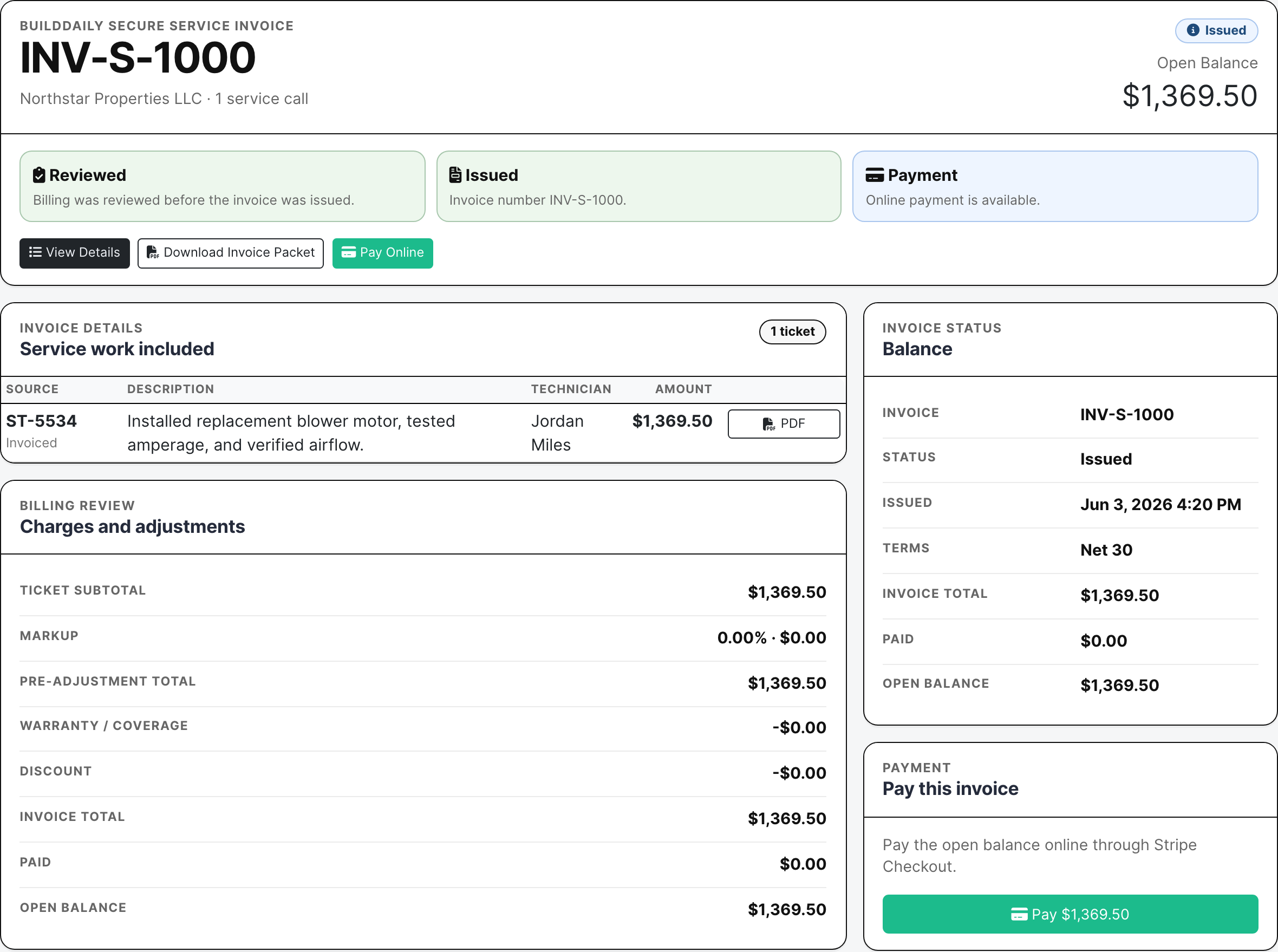
A service invoice can show the customer, ticket, packet, balance, terms, status, and payment action on the public invoice page. When Stripe is enabled, the invoice email can point customers directly to a payment link instead of making A/R chase checks.

  • Send service invoice packets with open balance and payment status
  • Give customers a no-login payment page when online payment is enabled
  • Keep invoice, packet, payment, receipt, and customer history connected
Public invoice payment link
The public invoice page shows the invoice, open balance, packet download, and payment button.

Progress billing carries the schedule of values

A project bill needs the SOV, approved change orders, retainage, tax context, current due, invoice number, package status, delivery trail, and supporting backup. BuildDaily keeps that billing context with the project so the PM and accounting work from the same numbers.

  • Build and lock the schedule of values
  • Create pay applications and keep invoice numbers attached
  • Track distributed packages, owner review, approved change orders, retainage, and current due
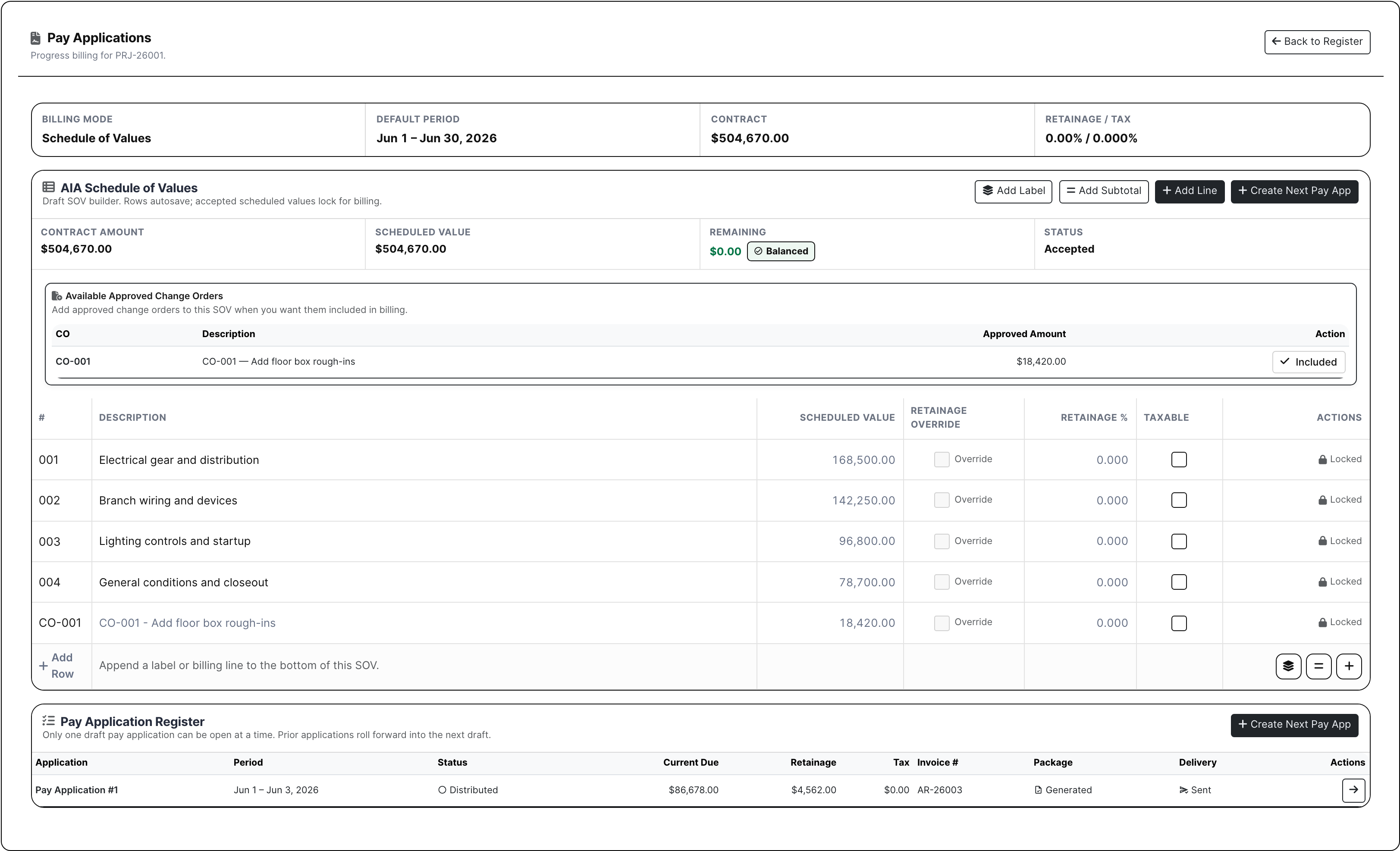
Project SOV billing
The SOV and pay application register show how progress billing turns into A/R context.

Service billing gets reviewed before it becomes A/R cleanup

Service work creates messy billing fast: emergency repairs, PM coverage, warranty decisions, discounts, markup, signed work, ticket packets, and invoice PDFs. The service billing review screen gives managers and accounting one place to fix blockers before the invoice is issued.

  • Review ticket pricing, warranty coverage, no-charge decisions, and discounts
  • Generate invoice packets after billing is clean
  • Move issued service invoices into payment history and open balance follow-up
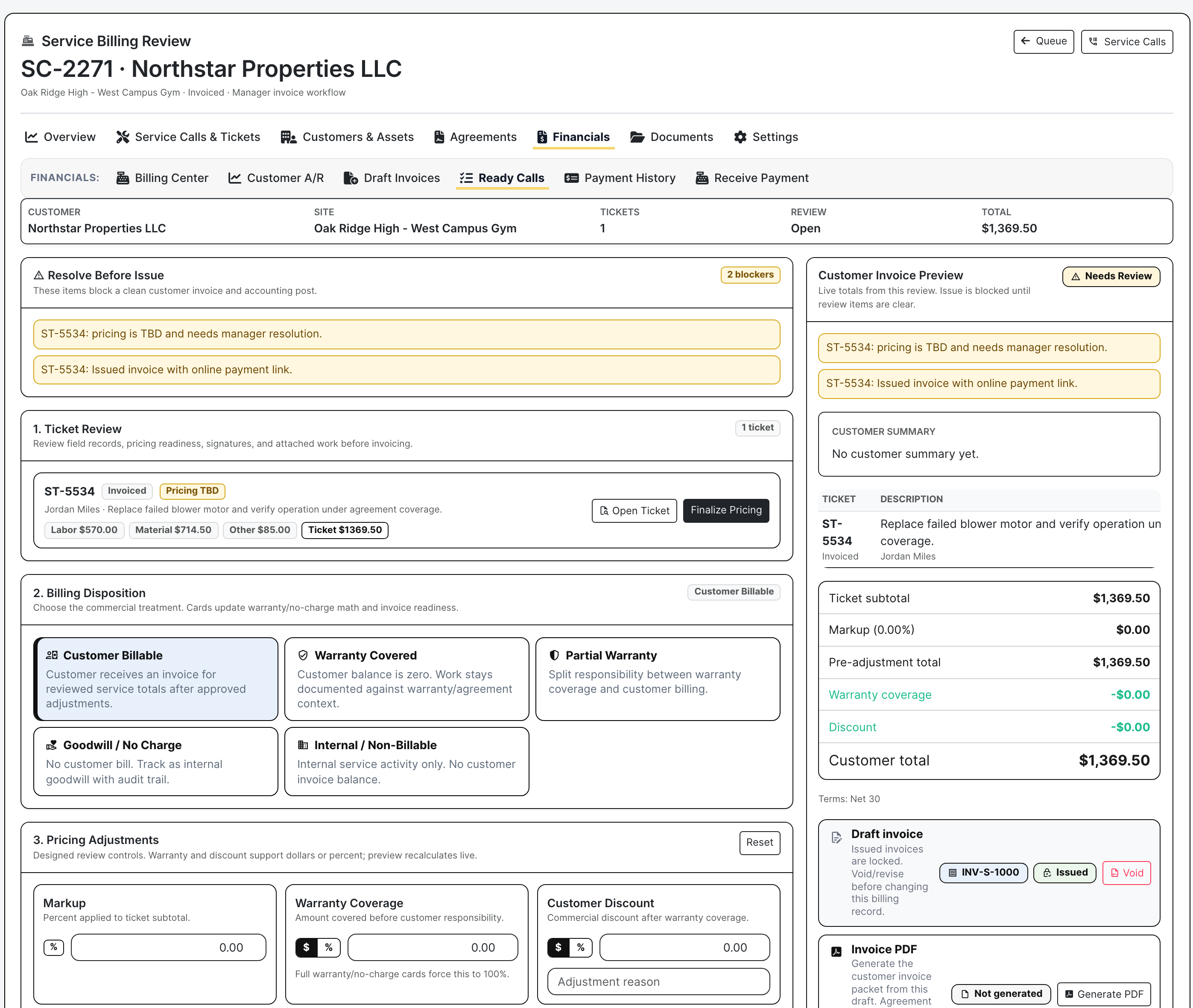
Service billing review
Billing review shows blockers, ticket totals, disposition, draft invoice state, and PDF/payment readiness.

A/R follows the job, customer, and ticket

Receivables need to answer who owes what, how old it is, what has been paid, what is still open, and which job, service call, or company it belongs to. BuildDaily keeps that payment trail visible from the project, service, and CRM context.

  • Track billed, collected, open, overdue, aging, and payment history from the project and customer context
  • Apply receipts to the right open item
  • Use CRM accounting context for customer and vendor finance signals
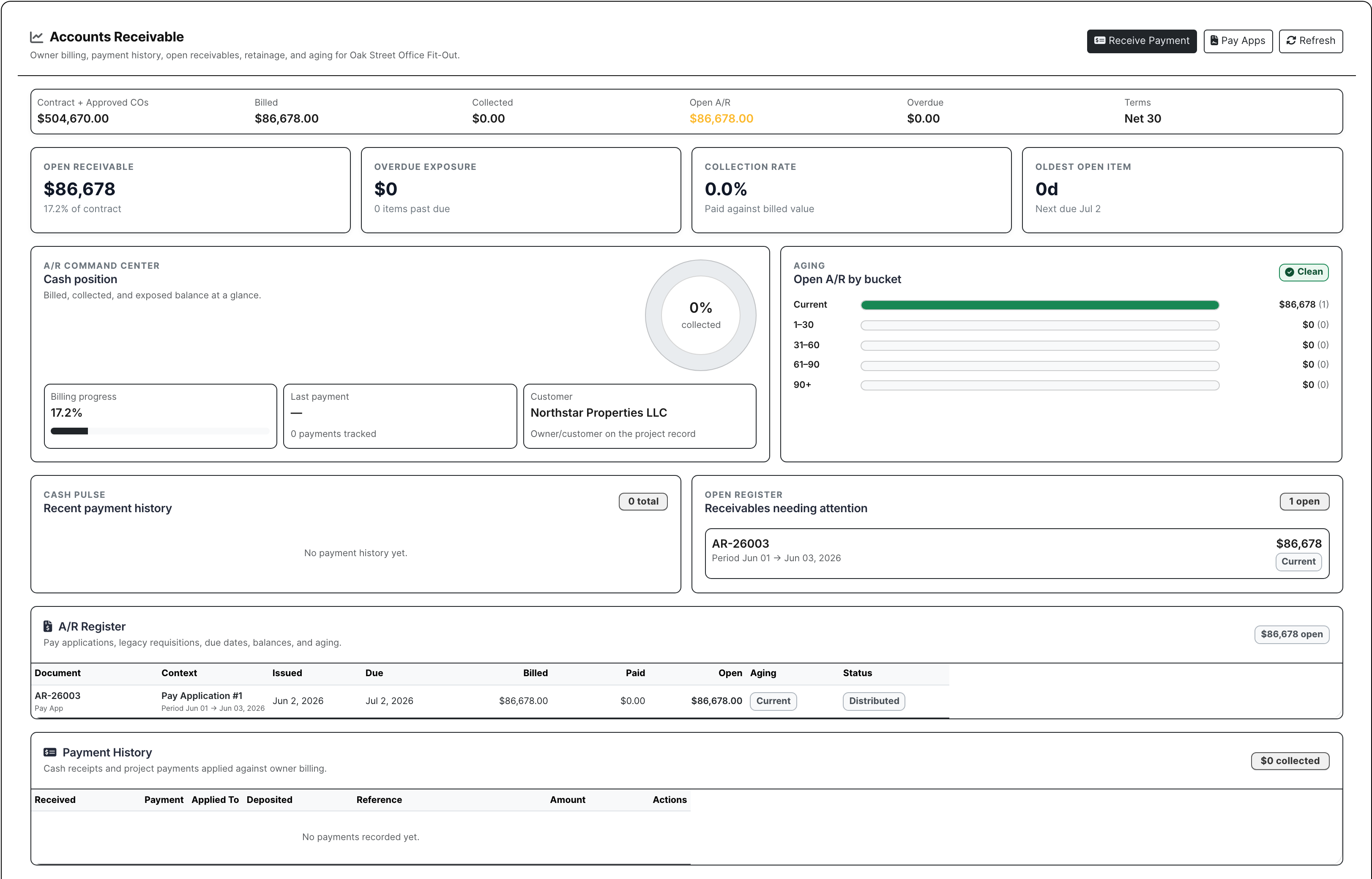
Project A/R dashboard
Project A/R shows the open receivable, aging, payment history, and register tied to the project.

Detailed Module Documentation

What is actually inside this module

Use this as the product-review checklist. Each item names a working surface or operational responsibility to inspect during a demo.

Current development scope

These workbenches exist but are not represented as a finished accounting replacement.

A/R and A/P workspaces Invoice, open-item, receipt, payment, and application models are under active development.
General ledger and periods Accounts, journals, posting batches, periods, close events, and diagnostics are development-stage.
Banking and reconciliation Connections, imports, matching, reconciliation, and payment batching are development-stage.
Payroll, purchasing, and job cost Provider handoff, purchase orders, commitments, budgets, WIP, and cost controls are development-stage.

Usable connected context

Financial context already appears inside operating workflows where it is safe to do so.

Service billing review Make ticket billing disposition and invoice readiness explicit.
Customer invoices and payments Use supported invoice packets, public payment links, payment state, and A/R visibility.
Project SOV and pay applications Manage project billing packages and receivable context from the project.
Change and T&M pricing Build priced backup before the work becomes customer billing.

Screenshots

Actual billing, A/R, and payment screens

Public service invoice with Stripe payment link
Customers can open a no-login service invoice, download the packet, see the open balance, and pay online through Stripe when payment links are enabled.
Project schedule of values and pay application register
Project billing keeps the SOV, approved change orders, retainage, current due, invoice number, package state, and delivery trail in one place.
Project accounts receivable command center
Project A/R shows contract value, billed amount, open receivable, aging, collection rate, payment history, and the receivable register tied to the job.
Service billing review with invoice blockers and disposition
Service billing review catches pricing, warranty, no-charge, adjustment, PDF, and invoice-readiness issues before the customer bill goes out.
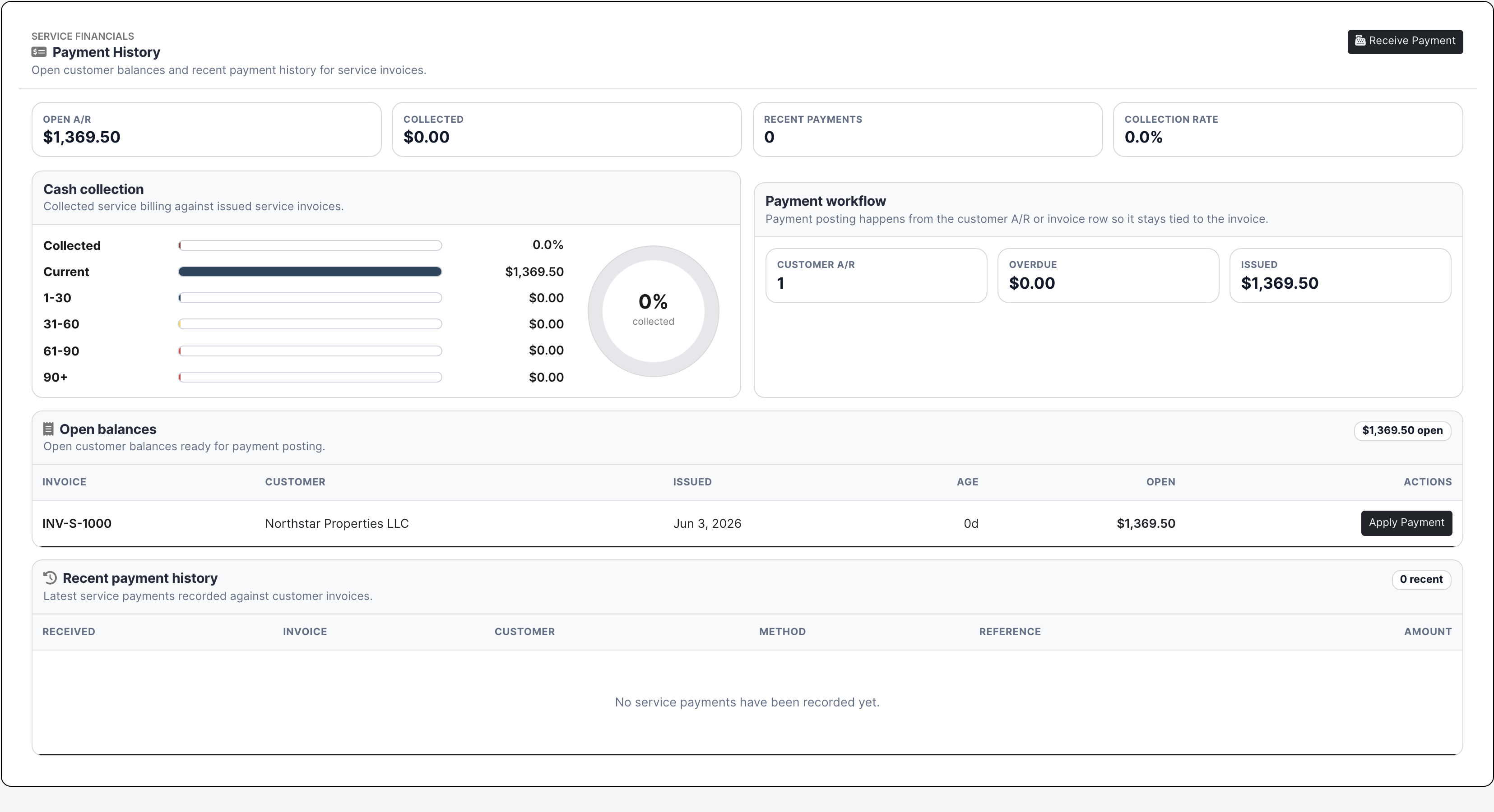
Service payment history and open balances
Service payment history keeps open A/R, aging buckets, issued invoices, customer payment workflow, and receipt/application follow-up visible.
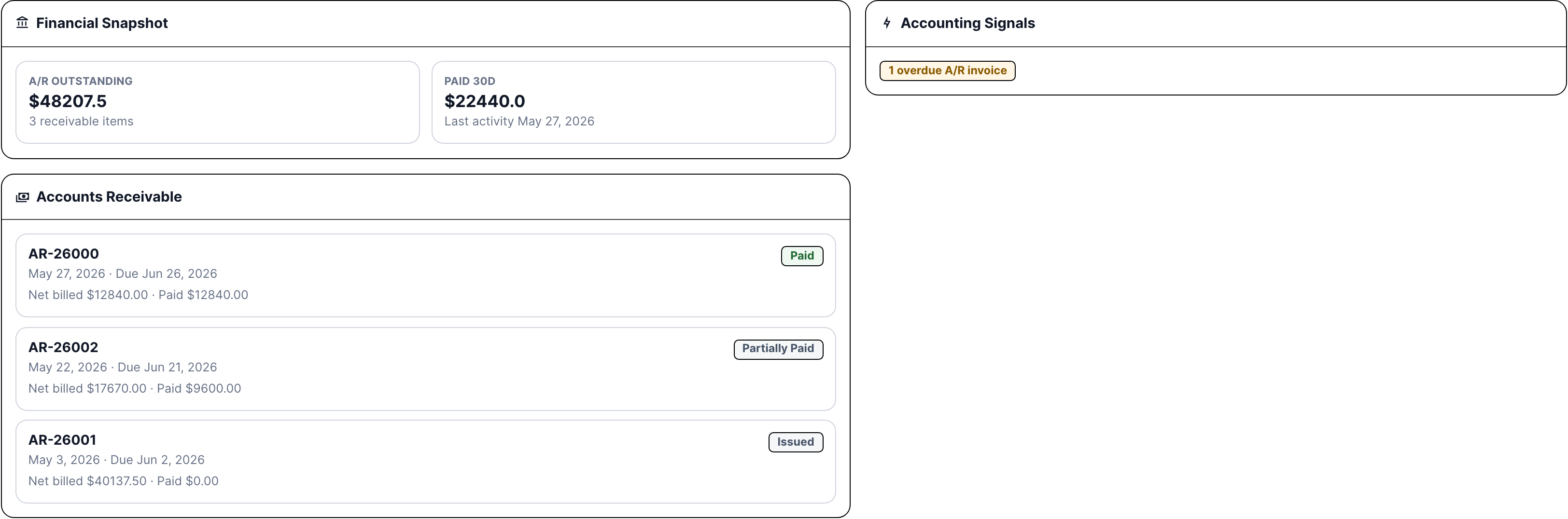
CRM accounting context for a customer or vendor
CRM accounting context keeps receivables, payables, purchase orders, subcontracts, overdue items, due-soon items, and paid activity tied to the company record.

Who Uses It

The people who need clean billing answers

Controller or accounting manager

Needs open invoices, aging, receipts, pay application packages, service invoice packets, customer balances, and exceptions without digging through project folders and service notes.

PM and project admin

Need SOV billing, approved change orders, retainage, invoice numbers, owner review, supporting files, and A/R status tied to the project they already manage.

Service manager and dispatcher

Need ticket pricing, warranty/no-charge decisions, invoice packets, payment links, customer balances, and payment history tied to service calls and agreements.

Owner/operator

Needs to know what can be billed, what was sent, what is unpaid, what is overdue, where customers can pay online, and which accounting areas are still in development.

Coverage

Accounting jobs contractors need covered

Contractor needs BuildDaily does it
Customer payment links Yes
Service invoices can show the packet, balance, terms, and Stripe-backed online payment action when payment links are enabled.
Project progress billing Yes
Project financials support schedule of values billing, pay applications, approved change order inclusion, retainage and tax context, invoice numbers, generated packages, and delivery state.
Open A/R by customer and job Yes
Receivable context tracks billed, paid, open, overdue, aging, collection rate, recent payments, open invoice registers, and payment history.
Service billing review Yes
Service billing review resolves ticket pricing, warranty coverage, no-charge treatment, markup, discounts, blockers, PDF packet generation, and invoice status before collection starts.
Customer and vendor finance context Yes
Company records can show receivables, payables, purchase orders, subcontracts, overdue items, due-soon items, approval needs, and paid activity where accounting records exist.
A/P and purchasing context Yes
A/P and purchasing areas are in development for vendor bills, purchase orders, receipts, matching, subcontracts, commitments, lien waivers, ready-to-pay items, retainage, and vendor balances.
Labor and payroll handoff Yes
Payroll areas are in development around BD Time sources, payroll runs, run items, imports, exports, worker links, provider settings, documents, and reports.
Job cost and WIP Yes
Job cost areas are in development around project budgets, cost codes, commitments, actuals, revised estimates, WIP snapshots, project workflow views, and cost-to-complete review.
Banking and G/L review Yes
Banking and G/L areas cover cash accounts, statement import, transaction matching, reconciliations, journals, posting batches, account activity, periods, trial balance, P&L, and balance sheet work in development.
Settings and exceptions Yes
Chart of accounts, mappings, posting policies, fiscal controls, dimensions, feature flags, integrations, documents, reports, saved views, worker state, and posting failures are tracked as the accounting area matures.

Contractor Problem

Bills get paid faster when the backup stays with the bill

Stop billing from becoming a scavenger hunt

The invoice, pay application, service ticket, packet, signed backup, customer, balance, and receipt should not be split across five places when A/R is trying to get paid.

Keep PMs, service, and accounting on the same numbers

A project bill should agree with the SOV and change orders. A service invoice should agree with the ticket and warranty decision. A/R should see the same totals the operating team sees.

Know what is ready and what is not

Billing and receivables are the clearest accounting wins today. The page also shows the A/P, payroll, purchasing, job cost, banking, G/L, reports, documents, settings, and diagnostics areas that still need full accounting evaluation.

Billing Path

From work performed to payment follow-up

1

Confirm the work is billable

Use project pay applications and service billing review to see what can be invoiced, what needs pricing, what needs owner or customer review, and which packet or PDF is ready.

2

Build the invoice or pay application

Generate the bill with the right customer, job or ticket, terms, totals, supporting files, invoice number, retainage, tax context, and approved changes attached.

3

Send the package and payment path

Issue the service invoice or pay application package, include the customer-facing payment link when enabled, and keep delivery state visible.

4

Track the open balance

Follow issued, open, overdue, paid, receipt, and aging state from the project, service ticket, customer, or company page.

5

Carry the context forward

A/P, purchasing, payroll, job cost, banking, G/L, reports, documents, settings, and diagnostics use the same job, customer, vendor, employee, and packet context as those areas continue development.

Accounting Areas

The accounting areas connected to billing

Customer money

Project Pay Applications SOV billing, approved change order inclusion, retainage, invoice number, package generation, owner review, and current due.
Service Billing Ticket pricing, warranty/no-charge disposition, invoice packets, draft/issued state, payment links, and customer A/R.
Accounts Receivable Customer invoices, open receivables, receipts, applications, aging, collections, statements, retainage, and customer balances.
CRM Accounting Company-level receivable, payable, purchase order, subcontract, overdue, due-soon, approval, and paid-activity context.

Vendor, labor, and job cost

Accounts Payable Vendor invoices, review, approval, matching, open payables, ready-to-pay, retainage, duplicate checks, and payment batches.
Purchasing Purchase orders, receipts, subcontracts, commitments, received-not-invoiced, item inquiry, physical count, lien waivers, and PO matching.
Payroll / Labor Cost BD time sources, payroll runs, run items, imports, exports, worker links, provider settings, payroll documents, and reports.
Job Cost / WIP Project budgets, cost codes, commitments, actuals, revised estimates, WIP snapshots, project cost workflow, and cost-to-complete review.

Banking, reports, and controls

Banking / Cash Cash accounts, deposits, payments, statement import, statement lines, matching rules, reconciliation, cleared/outstanding items, and exceptions.
General Ledger Journal entries, posting batches, account tree, trial balance, account activity, periods, reversals, financial reports, P&L, and balance sheet.
Reports and Documents Report library, builder, runs, artifacts, schedules, delivery logs, saved views, accounting document center, files, links, and diagnostics.
Settings and Diagnostics Accounting profile, chart of accounts, mapping matrix, missing mappings, posting policies, fiscal controls, feature flags, integrations, worker state, and posting failures.

Daily Handoffs

How billing stays tied to operations

Project billing to A/R

  • PM/admin prepares SOV and pay application from the job.
  • Accounting reviews invoice number, retainage, current due, package state, and owner delivery.
  • A/R tracks open balance, aging, receipts, and payment history against the same project record.

Service ticket to paid invoice

  • Service manager resolves pricing, warranty, no-charge, discount, and blocker state.
  • Invoice packet is issued with the service work and customer context attached.
  • Customer can pay online when Stripe payment links are enabled, and A/R can apply the payment against the invoice.

Customer and vendor balance review

  • CRM accounting context shows receivables, payables, purchase orders, subcontracts, overdue items, due-soon items, approvals, and paid activity.
  • Owners and accounting can see whether the company is a customer, vendor, supplier, subcontractor, or several at once.
  • The same company history supports follow-up, collections, vendor review, and project/service context.

A/P, payroll, banking, and G/L review

  • A/P, purchasing, payroll, job cost, banking, G/L, reports, documents, settings, and diagnostics show the job, vendor, customer, employee, and packet context they need.
  • Mapped accounts, fiscal controls, feature flags, integrations, worker state, and posting failures show what still needs attention.
  • Full accounting close replacement should be confirmed separately from the billing and A/R workflows shown here.

Walk through Get project bills and service invoices out clean

We can walk through the module around the way your company actually handles the work.

See it with your work