BuildDaily

Inventory

Inventory that keeps service parts and price-book items under control

Inventory is for the material a contractor keeps reusing: stocked truck parts, warehouse pulls, common service items, catalog families that need review, and price-book lines with cost and sell assumptions. The point is simple: stop recreating the same part on every ticket, know where stock moved, and keep material history tied to the work that used it.

Inventory Workflow

How parts move from catalog, to stock, to ticket history

Items: the parts techs should be able to pick again

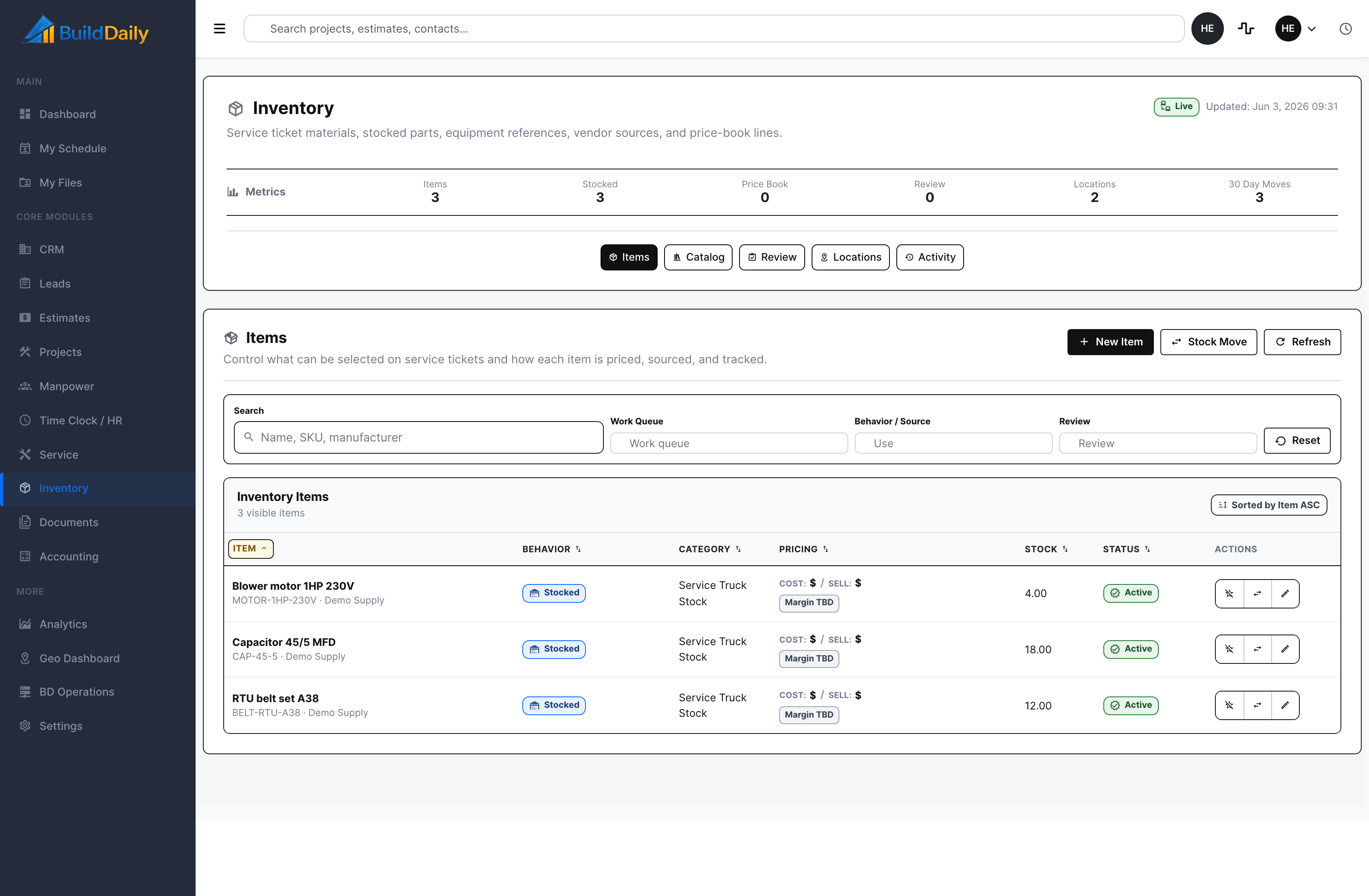
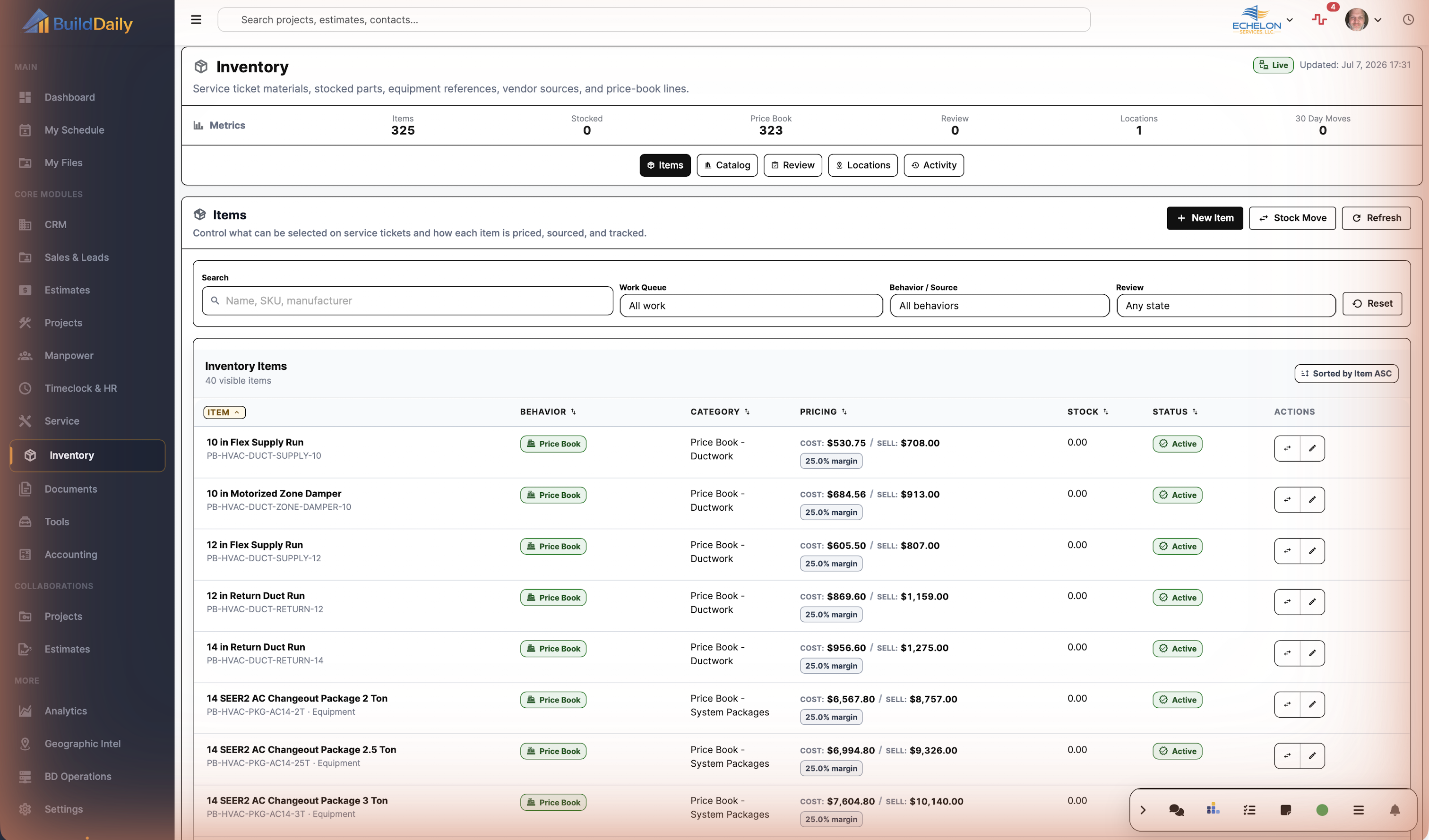
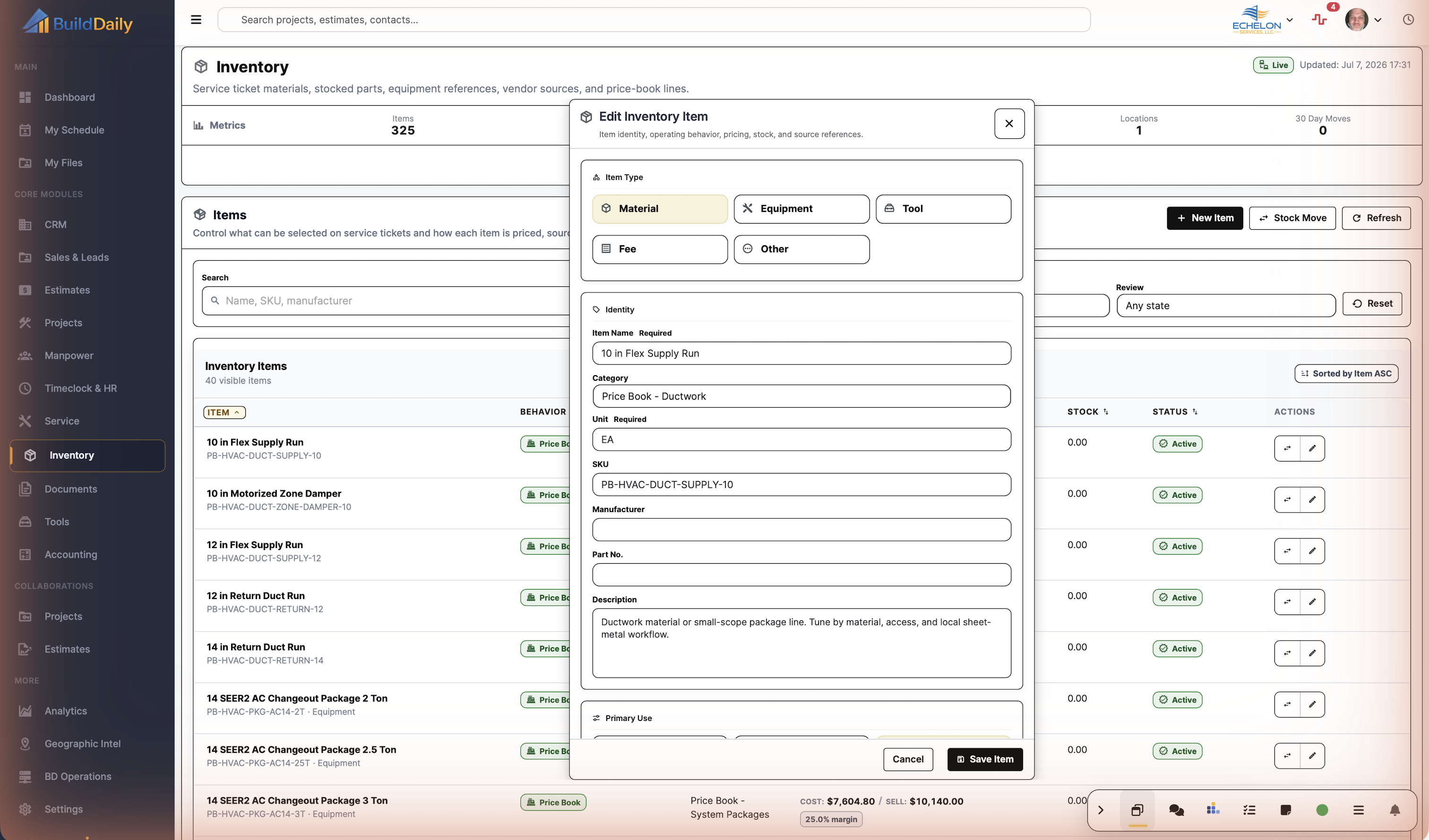
The Items tab is the working list for parts, equipment references, common service materials, and price-book items. A contractor can see the SKU, manufacturer, category, stock behavior, cost/sell posture, quantity on hand, status, and the actions needed to edit the item or post a stock move.

  • Create and edit items with SKU, manufacturer, category, unit, stock, common, vendor, equipment, or price-book behavior
  • See cost/sell fields and margin posture before a part becomes a billing problem
  • Post a receipt, issue, transfer, adjustment, return, or scrap move without leaving the inventory workspace
Inventory item dashboard
The item list is the control point for stocked truck parts and repeat service materials.

Catalog and review: keep one-off material from polluting the list

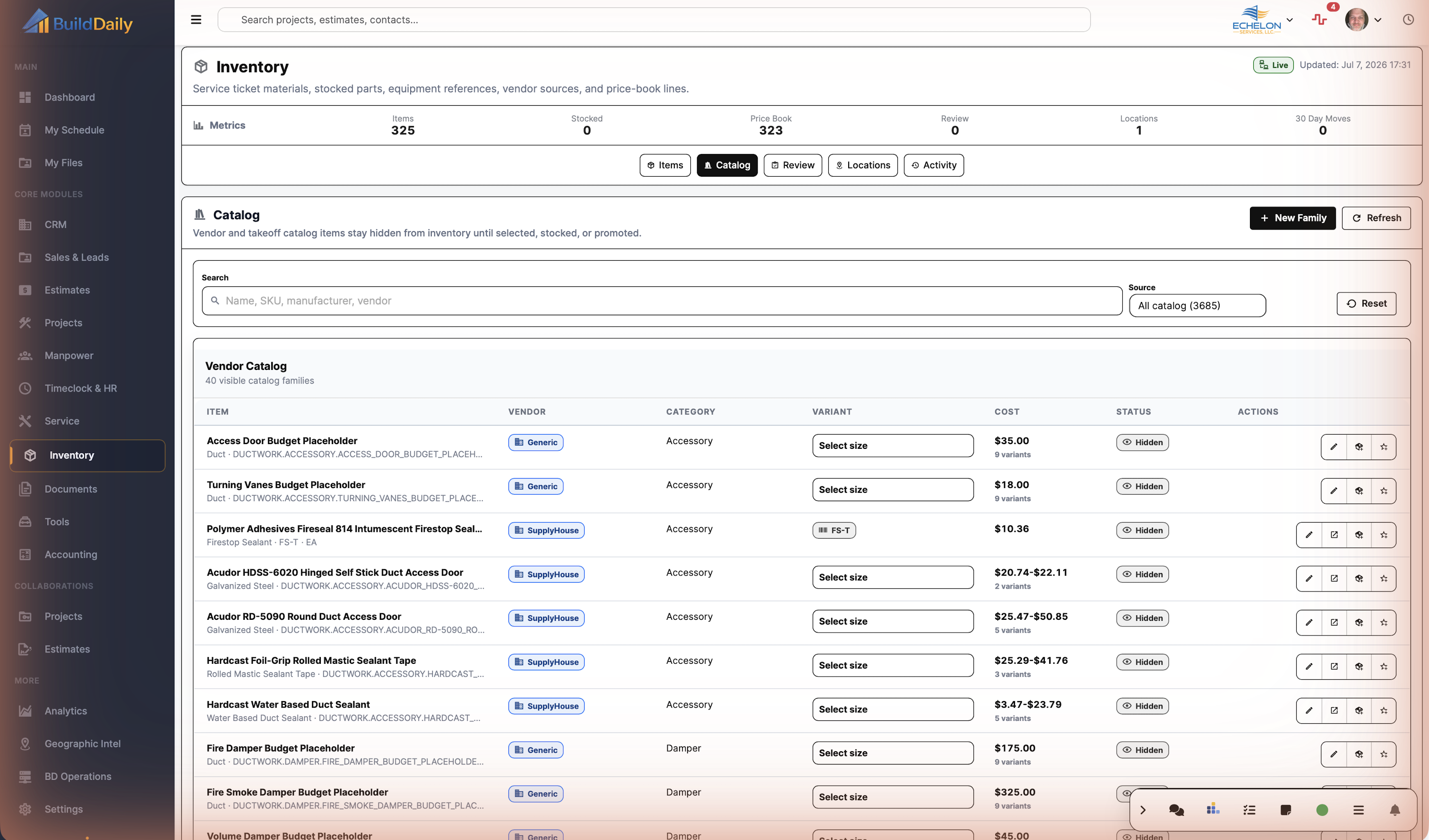
Vendor and takeoff catalog families stay hidden until a user promotes a selected size into Inventory or makes it a common service item. Review catches incomplete rows from ticket material or catalog selection before those names become permanent pick-list clutter.

  • Search catalog families by name, SKU, manufacturer, vendor, source, size, and cost basis
  • Promote a selected catalog size into inventory review or straight into common item use
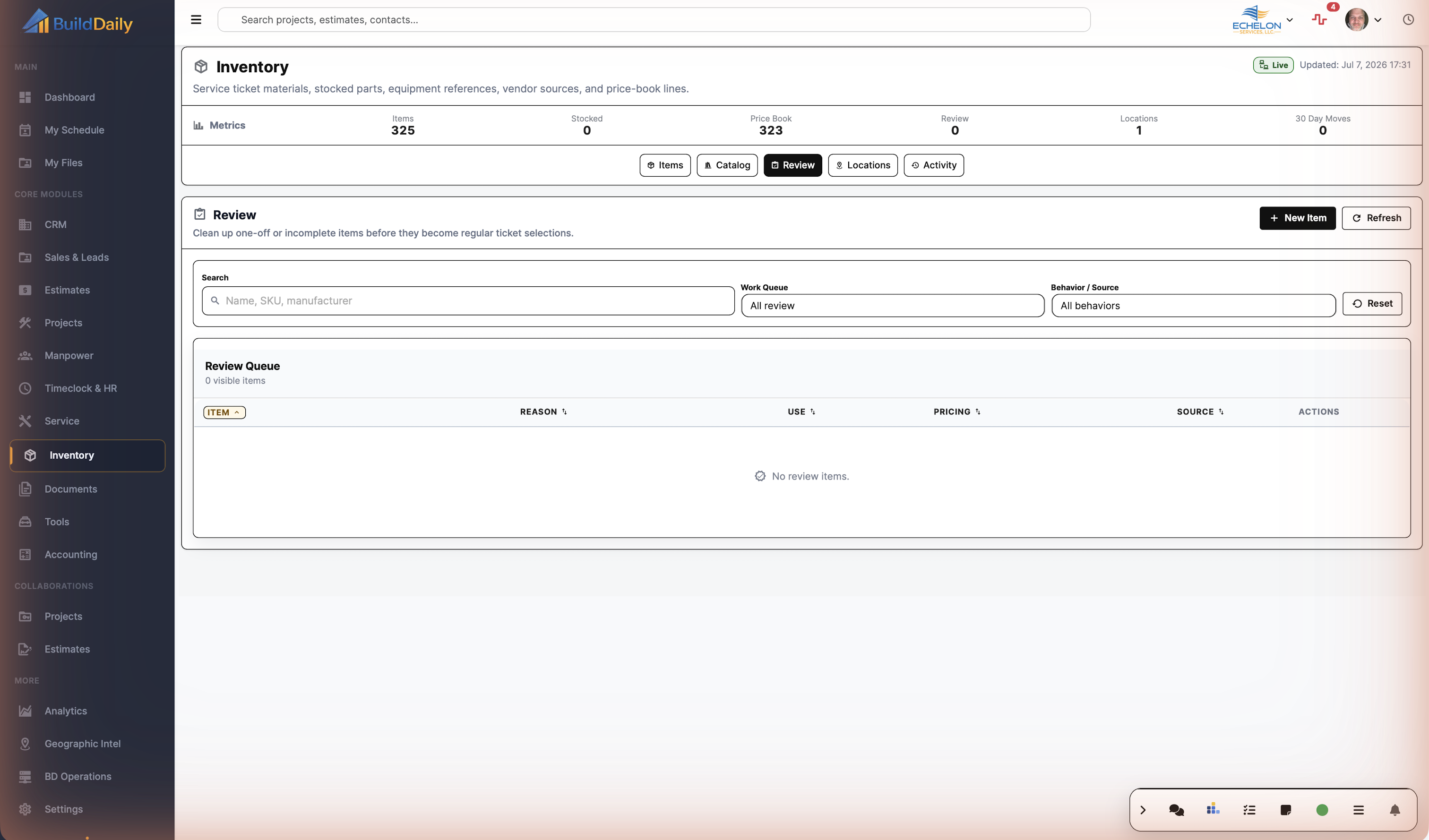
  • Edit, mark clean, or ignore review rows when service-ticket material needs cleanup
Inventory item and review context
Inventory separates repeat-use material from rows that still need cleanup.

Locations: warehouse, truck, jobsite, customer, and holding points

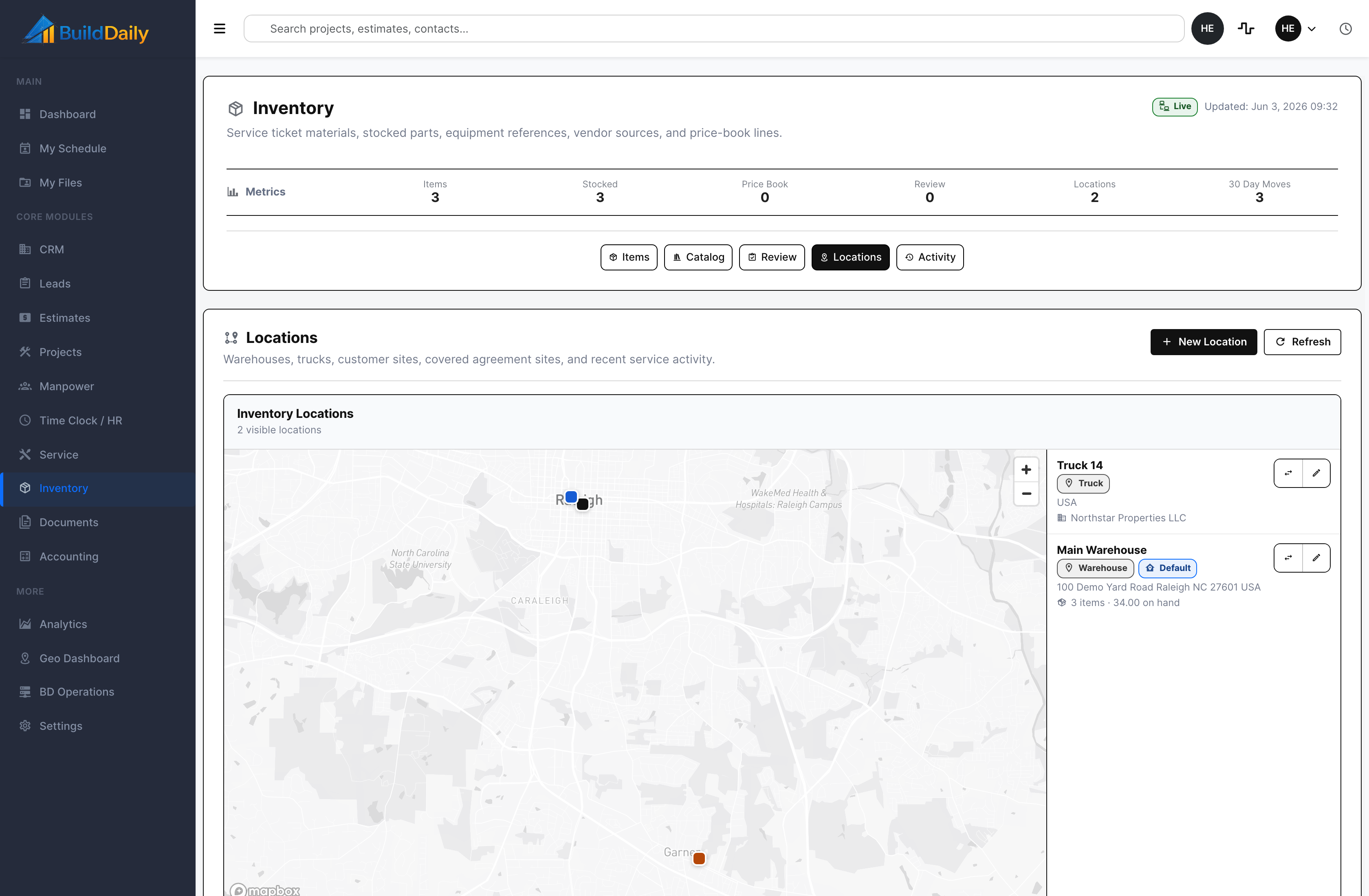
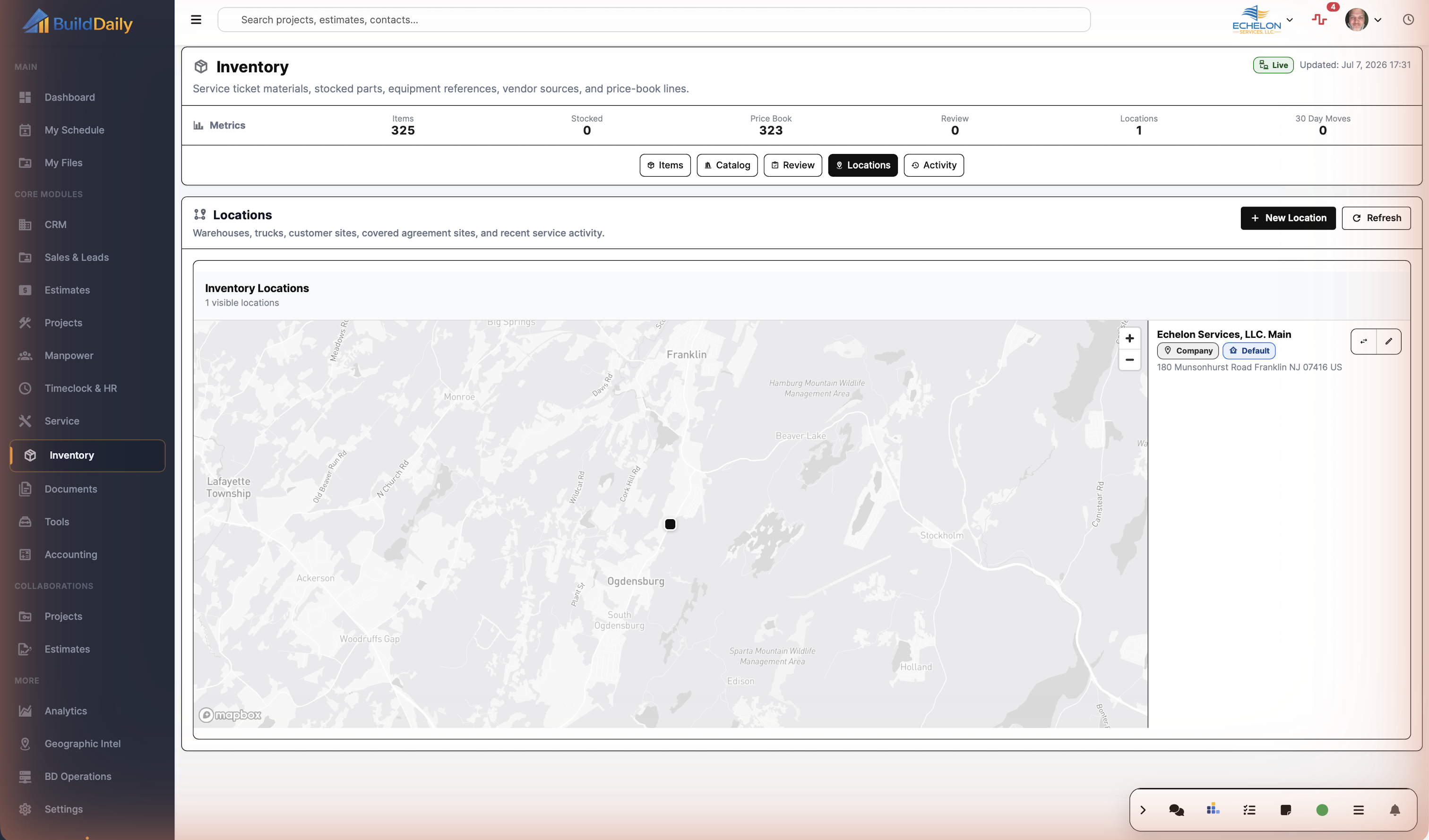
Inventory locations give material a real place to live. The app supports company, warehouse, truck, job site, customer, vendor, holding, and other location types with address, map, default-location, company, service-site, and stock-count context.

  • Create and edit stock locations with address and map context
  • Use trucks and warehouses as transfer points for service replenishment
  • See which locations carry stock and how much is on hand
Inventory locations
Locations make truck and warehouse stock visible as places material can move through.

Activity: prove what moved and why

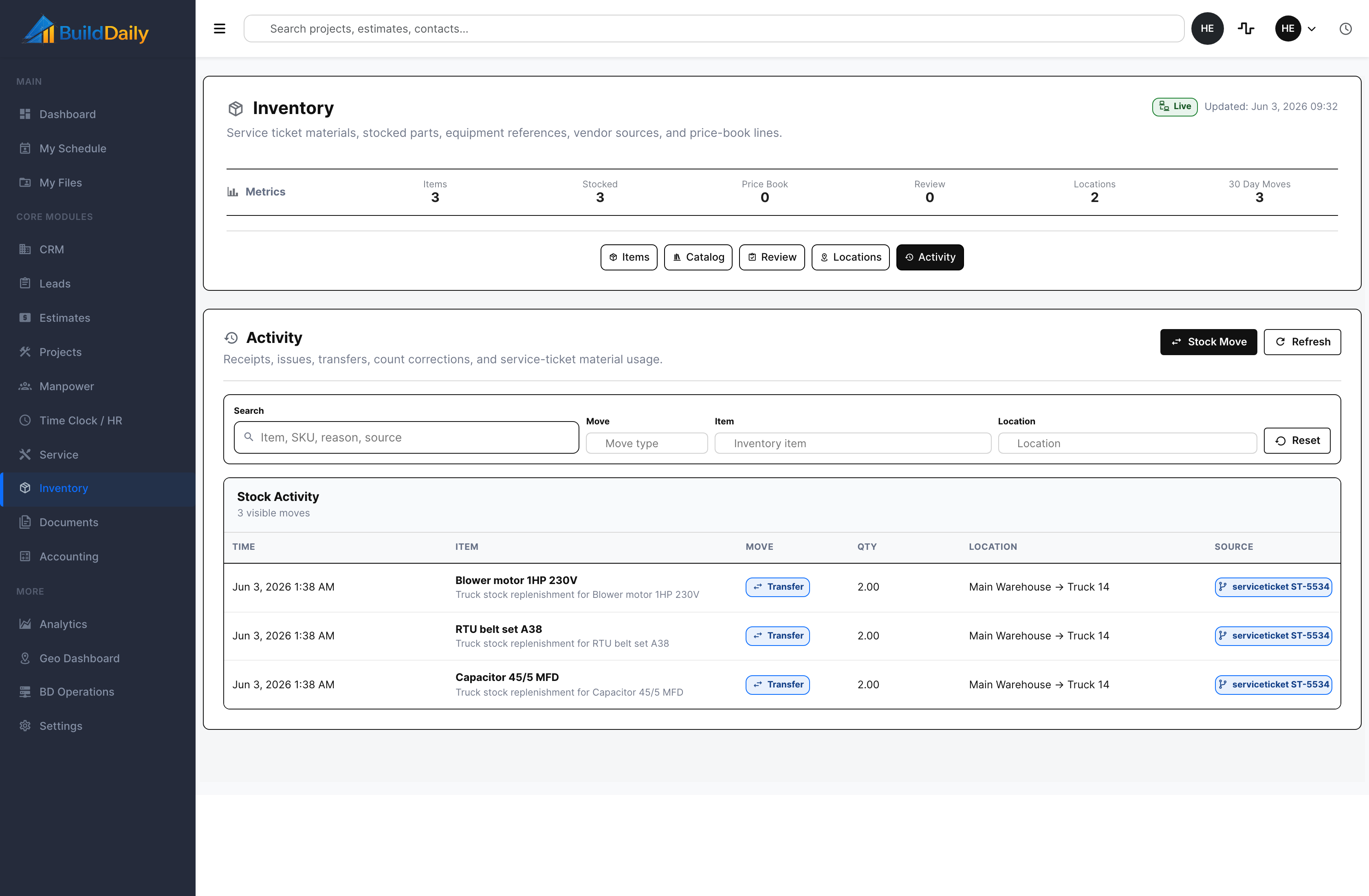
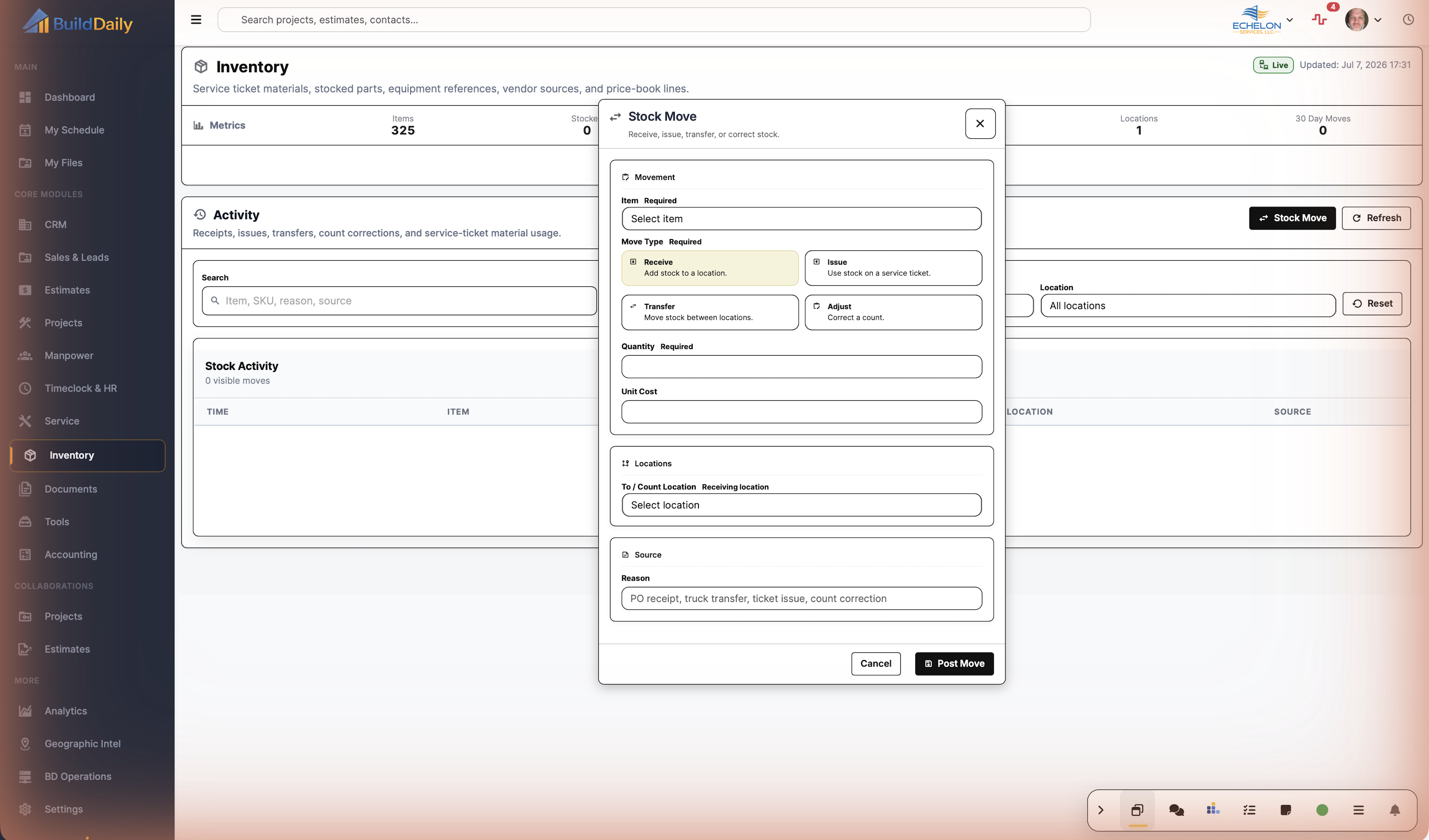
The Activity tab records receipts, issues, transfers, count adjustments, returns, scrap, and service-ticket material usage. That matters when a truck gets replenished, a warehouse count changes, or billing needs to know which ticket consumed the part.

  • Filter movement history by item, move type, location, reason, or source
  • Keep from-location, to-location, quantity, reason, actor, and source ticket context together
  • Give operations a trail for replenishment and shrinkage questions
Inventory activity
Movement history keeps service material usage and stock transfers visible.

Detailed Module Documentation

What is actually inside this module

Use this as the product-review checklist. Each item names a working surface or operational responsibility to inspect during a demo.

Catalog

Maintain the items service and project teams actually consume.

Items and categories Track SKU, description, unit, category, manufacturer, and active state.
Vendor and pricing profiles Maintain vendor references, cost, sell price, markup, and price history.
Equipment profiles Represent serialized or maintained equipment separately from ordinary stock.
Visual and catalog bindings Connect internal items to supported source or visual catalog references.

Stock control

Know what is available and why it moved.

Locations Track warehouse, truck, job, or other stock locations.
On-hand stock Maintain quantity, reorder level, and location-specific availability.
Movements Record receipt, issue, transfer, adjustment, return, and consumption history.
Activity Retain user, timestamp, source record, quantity, and notes for stock changes.

Service connection

Reduce the gap between technician use and office billing.

Ticket material lookup Select catalog material while working a service ticket.
Truck and warehouse visibility See likely availability before assigning or billing material.
Billing cleanup Compare field material entries with catalog, cost, price, and markup intent.
Reorder pressure Surface low-stock and replenishment work by location.

Inventory Proof

Actual Inventory screens with service-part examples

Inventory item list with stocked service parts
The item list shows stocked service parts with SKU, manufacturer, category, stock count, review state, and actions to edit or post a stock move.
Inventory locations map with truck and warehouse stock points
Locations put warehouse and truck stock on a map/list so the office can see the places material can be received, transferred, or consumed.
Inventory movement activity tied to a service ticket
Activity shows material movement, quantity, source ticket, and warehouse-to-truck transfer history instead of burying parts in ticket notes.
Inventory overview
Inventory starts with catalog, location, movement, and review pressure.
Inventory catalog
The catalog retains item identity, category, unit, vendor, cost, and price context.
Inventory items and stock
On-hand stock is visible by item and location rather than as an isolated spreadsheet total.
Inventory locations
Warehouse, truck, job, and other stock locations remain distinct.
Inventory movements
Receipts, issues, transfers, returns, and adjustments retain transaction history.
Inventory review and activity
Review and activity surfaces expose low stock, cleanup, and the history behind a quantity.

Operating Responsibilities

How the warehouse, service desk, and billing use the same part record

Service manager

Decides which parts should be selectable again, which one-off ticket rows need cleanup, and whether technicians are using material that should become a common item.

Warehouse or operations

Posts receipts, transfers, truck replenishment, count corrections, returns, or scrap so the office can see where material moved instead of guessing from texts.

Billing and owners

Use cost, sell, margin posture, price-book behavior, and movement source history to protect margin before parts become invoice lines or flat-rate assumptions.

Coverage

Inventory questions contractors have to answer

Contractor needs BuildDaily does it
Which parts can techs reuse on tickets? Yes
Items can be marked common, stocked, vendor-linked, equipment-related, price-book, active, inactive, or review-only so repeat material does not get recreated every time.
Can we search by real part information? Yes
Inventory item filters search name, SKU, manufacturer, behavior/source, review state, and work queues.
Can cost and sell assumptions stay with the item? Yes
Item rows show cost, sell/list price, margin posture, pricing method, and price history so parts are not treated as plain descriptions.
Can price-book methodology live beside stock items? Yes
Inventory supports price-book items with cost-plus, list-discount, flexible, locked, last-sold, rolling-average, and agreement-controlled price profiles.
Can catalog rows stay hidden until they are needed? Yes
Catalog families can stay hidden, be materialized into inventory review, or be promoted into common item use after a size is selected.
Can bad one-off ticket material be cleaned up? Yes
Review rows show reason, source, behavior, pricing, and actions to edit, mark clean, or ignore rows before they clutter the pick list.
Can warehouse and truck stock be separated? Yes
Locations support company, warehouse, truck, job site, customer, vendor, holding, and other stock points with default flags, address, map, company, and service-site links.
Can a stock move show from and to locations? Yes
Movements record receipt, issue, transfer, adjustment, return, and scrap with quantity, from-location, to-location, unit cost, reason, actor, and source record.
Can service material usage tie back to the ticket? Yes
Service material lines can point back toward inventory items or consumed items, and movements can carry service-ticket source context.
Can operations review movement history later? Yes
Activity can be searched and filtered by item, move type, location, reason, source, and date-ordered movement rows.
Can stock exceptions be caught? Yes
Blocked movement and low-stock paths notify operations when a move would create a stock problem or when issue/adjust/scrap pressure needs attention.

Part Flow

A stocked service part from setup to usage history

1

Start with the repeat part

The office creates or cleans up the item: name, SKU, manufacturer, category, unit, stock-tracked/common/price-book behavior, cost, sell, and whether it should show up for service use.

2

Keep catalog material under review

A vendor or takeoff catalog family can be searched, sized, and materialized into inventory. If it is not clean enough for repeat use, it lands in review instead of becoming another bad pick-list row.

3

Put stock in a real place

The warehouse, truck, company location, job site, customer site, or holding point is created with address/map context so a stock move can say where the material came from and where it went.

4

Move material when the work changes

Receipts, transfers, issues, returns, scrap, and adjustments capture quantity, unit cost where needed, reason, actor, and source context.

5

Use the history for replenishment and billing

Activity shows which part moved, how much moved, where it moved, and whether a service ticket drove it, giving operations and billing a cleaner trail than handwritten truck-stock notes.

Inventory Areas

The Inventory desk by operating question

Inventory workspace tabs

Items The stocked/common/price-book item list with SKU, manufacturer, category, cost/sell posture, stock quantity, status, edit action, common-item action, and stock-move action.
Catalog Hidden vendor and takeoff catalog families that can be searched, sized, edited, opened at the vendor page, added to inventory review, or promoted to common item use.
Review Cleanup queue for material created from service tickets or catalog selection, with reason, source, behavior, pricing, edit, mark-clean, and ignore actions.
Locations Map/list for company, warehouse, truck, jobsite, customer, vendor, holding, and other locations with stock counts, addresses, default flags, and movement actions.
Activity Movement log for receipts, issues, transfers, adjustments, returns, scrap, service-ticket material usage, and source-backed stock history.

Field Reality

Inventory work that has to survive a busy service week

Truck replenishment

  • Open the stocked item, post a transfer from the warehouse to the truck, and keep quantity/reason/source history attached.
  • Use the location list to confirm the truck and warehouse are valid stock points.
  • Review Activity later when someone asks why the truck count changed.

Service ticket material cleanup

  • Let ticket material feed inventory context when it should become a reusable part.
  • Use Review to edit, mark clean, or ignore rows that came in with weak names or missing source detail.
  • Promote only the parts the service team should actually pick again.

Catalog-to-inventory selection

  • Search vendor or takeoff catalog families by part, SKU, manufacturer, or source.
  • Choose the right size and add it to Inventory review or make it a common item.
  • Preserve vendor/catalog source detail instead of typing a part from scratch.

Price-book material control

  • Keep flat-rate or methodology lines in Inventory with price-book behavior instead of mixing them into ordinary stock counts.
  • Review cost/sell assumptions and pricing method beside the item record.
  • Use the same material control surface whether the contractor sells T&M parts or price-book work.

Walk through Inventory that keeps service parts and price-book items under control

We can walk through the module around the way your company actually handles the work.

See it with your work